If you’ve ever set up a satellite dish, calibrated a lab test station, or installed a 5G small cell in a tight urban lot, you’ve probably run into the same frustrating problem: RF signal loss in coaxial cable. You crank up the power, align the antennas to within a fraction of a degree, and still get weak readings on your spectrum analyzer, or video dropouts on a broadcast feed. As a supplier of RF coaxial cables, I hear this complaint at least a dozen times a week from installers, engineers, and project managers. What I’ve learned over the years is that signal loss isn’t just a “bad cable” issue—it’s a combination of small, avoidable choices that add up fast, often well before the cable is even installed. RF Coaxial Cable
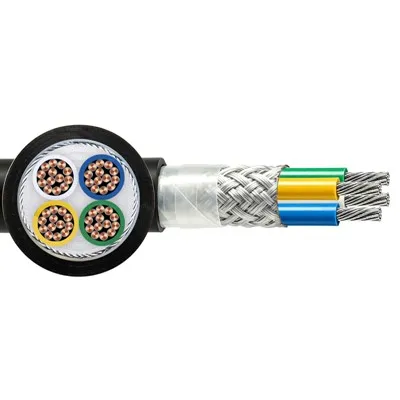
Let’s start with the basics, because you can’t fix what you don’t measure. RF signal loss in coaxial cable happens for two primary reasons: conductor loss and dielectric loss. Conductor loss comes from the cable’s inner and outer conductors—current flowing through metal encounters resistance, and at high RF frequencies, that resistance increases because of the skin effect, where electrons travel only along the surface of the conductor, not through its core. Dielectric loss comes from the insulating material (dielectric) between the inner and outer conductors; RF energy that isn’t transmitted along the cable is absorbed by this material, turning into heat. Both factors get worse as frequency goes up—a 10 dB loss at 1 GHz on a 100-foot cable becomes 25 dB at 10 GHz, which is a huge difference for applications like 5G millimeter wave or satellite Ka-band.
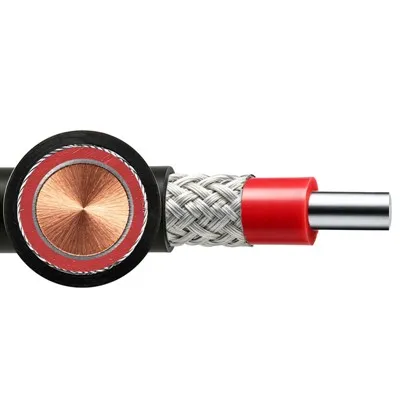
Now, let’s talk about the choices you make when selecting your cable, because this is the first line of defense against loss. I’ve seen installers pick the cheapest cable on the shelf for a high-frequency job, and wonder why their signal is dead by the end of the run. Gauge matters here, but not just the outer diameter. For example, a low-loss cable with a solid copper inner conductor (not copper-clad steel, which is cheaper but has higher resistance) will have far lower conductor loss than a cheaper alternative. The dielectric is another big one: polyethylene (PE) is common, but foamed polyethylene has trapped air bubbles that reduce the dielectric constant, cutting down on dielectric loss. For ultra-high-frequency applications, PTFE (Teflon) dielectric is even better, though it comes with a higher price tag. I always tell customers to match the cable’s loss specification to their frequency range—don’t use a general-purpose cable for 5G, because it’s simply not engineered for that bandwidth.
Next, the installation process is where most of the avoidable loss happens, and this is where even the best cable can be ruined. Let’s start with bending. Coaxial cables have a minimum bend radius—if you bend them tighter than that, you damage the internal structure, crimping the conductors and squishing the dielectric, which increases both conductor and dielectric loss. I’ve seen installers bend a ¼-inch cable around a 2-inch pipe (its minimum bend radius is 4 inches) to save a foot of run. Within weeks, that cable was showing 3x the rated loss, and they had to replace half the installation. The rule of thumb I push is: never bend a cable tighter than its rated minimum bend radius, and if you have to route it around obstacles, use cable supports to keep bends gradual, not sharp. Even for flexible cables, repeated bending (like through walls or along moving equipment) causes fatigue over time, leading to tiny cracks in the conductors that increase loss.
Then there’s connector installation, which is probably the biggest culprit I see. Terminating coaxial cables wrong is like plugging a faulty wire into your TV—you’re adding resistance and signal gaps right at the connection point. The key here is consistency and care. First, use the right tool for stripping the cable jacket and dielectric. If you nick the inner conductor while stripping, that creates a sharp point where RF energy reflects, leading to loss. I once watched a technician use a sharp knife to strip a cable, and he nicked the inner conductor so bad that the connection had 2 dB of extra loss just because of that tiny cut. For a 50-foot run, that’s half the total loss you expected. Also, make sure the inner conductor is fully inserted into the connector, and that the outer conductor is properly crimped or soldered (depending on the connector type) to the outer sheath of the cable. Don’t over-tighten connectors—plastic connector housings can crack, and metal ones can strip threads, which creates a bad connection. A torque wrench for connectors isn’t overkill; it ensures every connection is identical, which means predictable, low loss across the entire system.
Another thing that people overlook is the quality of the cable itself when it arrives. Even reputable brands can have manufacturing defects—an uneven outer conductor, a dielectric with trapped moisture, or a small gap in the shielding. When we get a cable back from a customer who’s having loss issues, the first thing we do is test it in our lab. More often than not, the cable itself is within spec, but sometimes we find that the inner conductor is slightly off-center, which changes the impedance (RF cables are designed for a precise 50 ohms or 75 ohms, depending on the application). Impedance mismatch causes signal reflection, which translates directly to loss. So when you’re ordering cable, ask for a batch test sheet, and if you’re working with a supplier that won’t provide that, find a new one. As a supplier, I always include test data for every batch we ship, because I know even a tiny manufacturing flaw can ruin a customer’s entire project.
Environmental factors also contribute to signal loss, especially for outdoor installations. Moisture is the biggest enemy here. If water gets into the cable jacket, it soaks the dielectric, increasing its loss and also causing corrosion on the conductors. For outdoor cables, make sure the jacket is fully sealed, and that all connectors are properly weather-sealed with gaskets or heat-shrink boots. I remember a customer who installed a cable run for a cell tower, and skipped sealing the connectors to save time. Within a year, the cable had absorbed enough rain to add 8 dB of loss, and they had to climb the tower to replace it—costing them thousands in labor, not just a new cable. Temperature also plays a role: cold weather can make the dielectric more rigid, leading to increased loss, while extreme heat can soften the conductors, making them more prone to bending damage. If you’re installing in an area with wide temperature swings, ask for a cable that’s engineered for extreme temperature ranges, not a general-purpose one.
Let’s talk about testing, too, because you can’t manage what you don’t verify. Before you finish a run, use a time-domain reflectometer (TDR) and a network analyzer to check for loss points. A TDR will show you where a bend, bad connector, or damaged cable is located by sending a signal along the line and measuring reflections. I always advise customers to test every segment of cable before connecting it to the transmitter or receiver. If you find a 1 dB loss point at a connector, you can fix it before running the rest of the system, rather than troubleshooting a whole installation later. Many people skip this step, assuming everything is fine because the cable has a low-loss rating. But the rating is for ideal conditions in a lab—real-world installations have variables that only testing can catch.
As a supplier, my goal isn’t just to sell you a spool of coaxial cable. It’s to help you get the signal performance you’re paying for, because I know that bad signal translates to missed deadlines, extra costs, and unhappy customers. I’ve worked with everything from small home internet installers to large telecom companies, and the best projects are the ones where we talk early—before they order the cable, before they start installation. We help them pick the right cable for their frequency range, their installation environment, their bend radius needs, and their budget. We also share best practices for installation, because even the best cable won’t perform if it’s installed wrong.
I’ve seen too many projects go sideways because of avoidable signal loss. A 5G small cell that can’t reach its intended coverage area because they used a general-purpose cable at 28 GHz. A satellite uplink that drops video because of a sharp bend in the cable. A home internet setup with slow speeds because of a bad connector. All of these are fixable with small, intentional choices: picking the right cable, following bend radius rules, terminating connectors carefully, sealing outdoor connections, and testing every step.
If you’re working on an RF project and are tired of chasing signal loss, or if you just want to make sure you’re getting the most out of your coaxial cable, I’m here to help. We can walk through your application, review your requirements, and answer any questions you have about cable selection, installation, or testing. Don’t let avoidable loss derail your next project—reach out, and let’s work together to get the signal performance you need.
Cable Assemblies & Accessories References
- RF Cable and Connector Design, Application, and Installation Best Practices, IEEE Standards Association
- Coaxial Cable Loss Calculations, Microwave Journal, Vol. 52, No. 1, 2019
- Installation Guidelines for RF Coaxial Cables, National Association of Broadcasters Engineering Handbook, 10th Edition
- Skin Effect and Conductor Loss in RF Transmission Lines, Electronics Tutorials, 2021
- Dielectric Materials for High-Frequency RF Applications, Wiley Encyclopedia of Electrical and Electronics Engineering, 2020
Yangzhou Huayu Cable Co., Ltd.
Yangzhou Huayu Cable Co., Ltd. is one of the most professional rf coaxial cable manufacturers and suppliers in China, also supports customized service with low price. Please feel free to wholesale advanced rf coaxial cable made in China here from our factory. Contact us for pricelist.
Address: No.9 Jingang Road, Yangzhou City, Jiangsu Province, China
E-mail: info@huayucabletech.com
WebSite: https://www.huayucabletech.com/
